
How to Make MIDI Trumpets Sound Real (Without Endless Editing)

Updated: Apr 21
If you’ve ever searched for ways to make your MIDI brass sound more realistic, you’ve probably tried everything:
Velocity tweaks.
Timing shifts.
Layering different articulations.
And still… it doesn’t quite feel right.
The notes are there.
The harmony works.
But the impact is missing.
The reason is simpler than it seems, and once you understand it, your trumpet writing changes immediately.

The Real Role of Trumpet in Film Music
Trumpet is not just a “brass layer.”
In cinematic writing, it’s often responsible for:
Defining rhythm
Driving momentum
Delivering impact
Think about action or adventure cues. That sense of urgency and clarity often comes from how the trumpet is played, not just what it plays.
And that leads to the real issue.
Why Most MIDI Trumpets Sound Fake
Most mockups are built like this:
You load a patch.
You write short notes.
You adjust velocity.
You tweak timing.
On paper, everything looks correct. But musically, it feels flat.
That’s because you’re trying to build a performance one note at a time.
Real trumpet players don’t think like that. They think in phrases.
What Real Trumpet Playing Actually Does
A real player is constantly shaping the music in ways MIDI doesn’t naturally capture:
The attack of each note (sharp, soft, accented)
The breath between notes
The push and pull of timing
The connection between notes inside a phrase
This is what creates energy. Not just the notes themselves, but how they arrive and move forward.
Why Repeating Short Notes Doesn’t Work
One of the most common approaches is stacking staccato or marcato notes to simulate rhythm.
It works… to a point. But it lacks something critical:
Continuity of intention.
When a player performs a rhythmic figure, the notes are not isolated events. They are part of a single musical gesture.
That gesture includes:
Micro variations in timing
Natural dynamic movement
Subtle differences in attack
These details are what your ear recognizes as “real.” Without them, the result feels mechanical.
A Practical Way to Improve Your Trumpet Writing Today
You don’t need a new library to start improving this right now.
Here are a few immediate adjustments you can apply:
1. Think in phrases, not notes
Instead of programming individual hits, write short rhythmic ideas as if a player were performing them in one breath.
2. Limit your editing
Over-quantizing and over-editing removes the natural variation that creates life.
3. Vary your attacks intentionally
Not every note should hit the same way. Even small differences create a more believable result.
4. Write for function, not density
Use trumpet where it matters: to define rhythm, highlight accents, or drive motion. Not just to “fill space.”
These steps alone can already improve your mockups. But there’s still a limitation.
The Missing Piece: Performance
Even with careful programming, you’re still reconstructing something that was originally performed.
And that takes time. A lot of time.
This is exactly where most composers get stuck:
You start composing…
Then you switch to editing…
And momentum disappears.
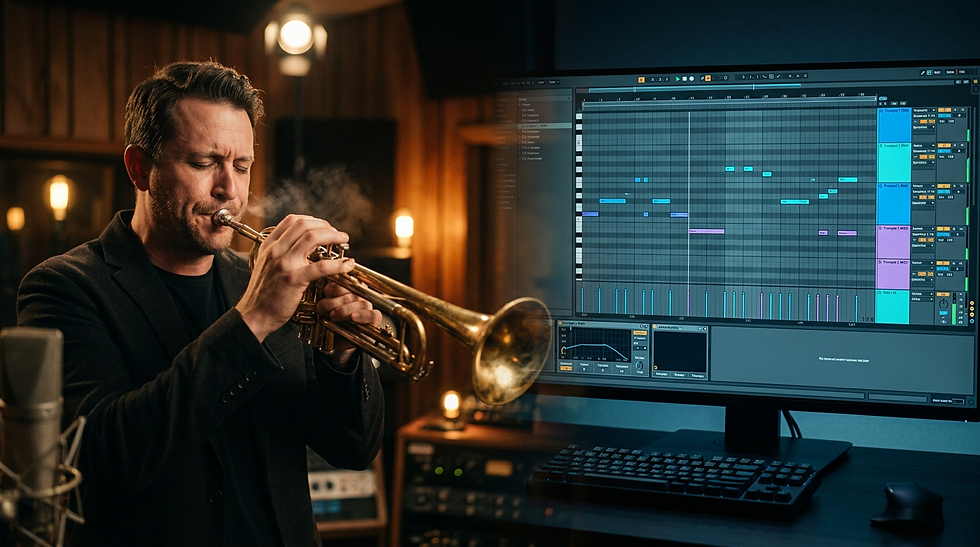
What Real Performance Actually Looks Like
To understand the difference, it helps to see it.
All the rhythmic cells in Forge Trumpet were performed by a real player: Johab Quadros.
Not programmed. Not simulated.
Played.
When you watch him perform, you start to notice things that are almost impossible to recreate with MIDI:
The natural variation between attacks
The way phrases breathe and flow
The subtle timing shifts that create momentum
The physical energy behind each gesture
This is the layer that makes trumpet parts feel alive.
And it’s exactly what most mockups are missing.
Watch the source of the sound:
Instead of building performance from scratch, what if you started with it?
That’s the idea behind Forge Trumpet.
Instead of isolated articulations, it gives you real recorded rhythmic performances, played by an actual trumpet player.
So when you press a key, you’re not triggering a note.
You’re triggering a musical gesture.
With:
Natural attacks
Real phrasing
Built-in rhythmic flow
From Programming to Composing
The shift is simple, but powerful: You stop fixing MIDI. You start working with something that already sounds musical.
Less time editing. More time writing.
Try It in Your Own Workflow
If you’ve been struggling to make your trumpet parts feel alive, the solution might not be more control. It might be starting from the right source.
Real performance. Now playable.


The focus on making MIDI brass feel real without endless editing is spot-on—small performance details can make a huge difference. I’ve been using https://vibe-codeai.pro/vibe-code-website